


How the 2026 Honda Odyssey’s Rear Entertainment System Makes Every Trip Smoother for West Allis, WI Families
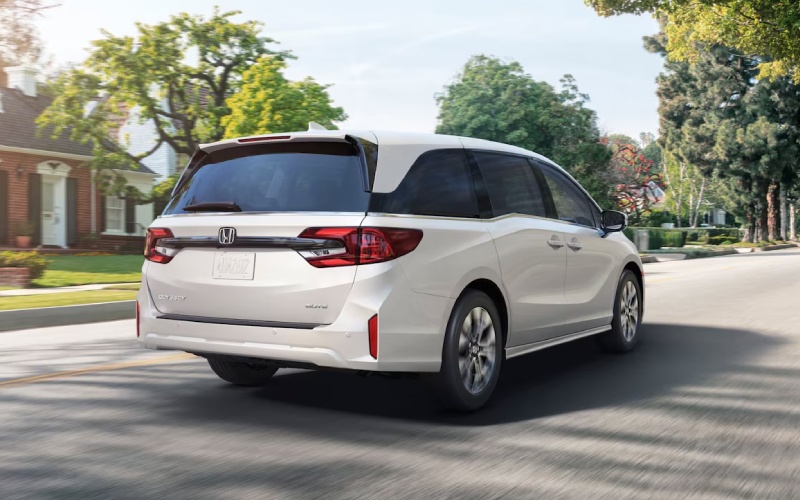
Russ Darrow Honda – How the 2026 Honda Odyssey’s Rear Entertainment System Makes Every Trip Smoother for West Allis, WI Families
If you’re mapping out busy family days around West Allis, WI, the 2026 Honda Odyssey’s Advanced Rear Entertainment System is one of those features that can instantly change the tone of a drive. Available on Touring and Elite, the system brings a 12.8-inch high-resolution screen to the second and third rows, making it easy for kids to follow the action without craning necks or crowding a single seat. The display’s placement and size create a clear sightline from both outboard seats and the middle, so sharing shows, games, and movies becomes effortless—not a squabble over screen time.
Pair that with wireless Apple CarPlay® and Android Auto™ compatibility on the 9-inch touch-screen up front, and you have a command center that lets you cue playlists, podcasts, and navigation without juggling cables. Long story short: the Odyssey helps the driver stay focused while everyone else stays happily occupied. That’s the kind of small win that makes each errand run or cross-town trip feel lighter and more relaxed.
What Sets the Odyssey’s System Apart
Honda designed the Advanced Rear Entertainment System to feel like a living-room screen on the go. The 12.8-inch high-resolution display covers a larger field of view than small tablets and doesn’t rely on shaky mounts. HDMI and USB ports are close at hand, so you can plug in a streaming device or connect a gaming console for longer travel days. Touring and Elite also bring Wi-Fi® hotspot capability, enabling wireless audio and video streaming with a capable data plan, so there’s less fumbling with downloads and more time focused on getting where you’re going.
There’s real value in the little details too. Multi-zone audio means front-seat conversations can continue uninterrupted while the second and third rows enjoy their own volume settings. When you want to speak to the back rows, CabinTalk® projects your voice through the rear speakers or compatible headphones, and CabinWatch® lets you check in via the front display—especially helpful when you want to confirm that everyone’s buckled or that snacks made it to the right hands.
Setup Tips for a Better Experience
Starting strong with your media setup is worth the two-minute checklist. First, decide whether to stream or plug in. If streaming, activate the vehicle’s Wi-Fi® hotspot on Touring or Elite, sign into your service, and have at least one backup show downloaded on a device in case connectivity dips. If you prefer a hardwired source, connect an HDMI device and store cables in the center console so they’re always available. Finally, pair Bluetooth® headphones for each rear passenger—this keeps the cabin quiet and helps prevent arguments over volume.
- Source selection: Pre-choose a main streaming app and a backup option to reduce on-the-fly decisions.
- Cables and power: Keep an HDMI cable, a device charger, and a portable battery pack in the console or seatback pocket.
- Headphone plan: Assign each child a labeled pair of Bluetooth® headphones for fast, drama-free pairing.
- Content rules: Agree on screen-time windows so kids know when it’s showtime—and when it’s time to look out the window.
Cabin Harmony With CabinWatch and CabinTalk
CabinWatch® and CabinTalk® aren’t just conveniences—they’re tools for calmer trips. With CabinWatch®, you can monitor the second and third rows on the front display, day or night. This quiet check-in is great for younger kids when you want visual reassurance without turning around. CabinTalk® lets you gently direct attention—remind someone to hand off the charger, confirm snack breaks, or coordinate headphone pairing—without raising your voice. Families who use both features tend to have fewer misunderstandings and a more relaxed driving rhythm.
These tools also help with transitions. Heading to athletic practice or a recital? Use CabinTalk® to cue pack-up mode while you’re approaching drop-off. In crowded pick-up lines or busy parking lots, having a calm, clear way to coordinate helps everyone move more efficiently and safely.
Which Trim Is Right For You?
If the Advanced Rear Entertainment System is a must-have, start with Touring or Elite. Touring delivers the big screen, Wi-Fi® hotspot capability, and navigation features families love for day trips, while Elite adds premium touches like heated and ventilated front seats and a heated, leather-wrapped steering wheel. If you’re on the fence, consider your typical trips: frequent drives across town, weekend tournaments, or long visits with relatives are prime scenarios where the system truly shines.
Even without the big screen on lower trims, the Odyssey’s 9-inch touch-screen with wireless Apple CarPlay® and Android Auto™ compatibility sets a strong foundation for front-row management. You can still route audio to the rear via multi-zone audio, then layer in powered USB ports throughout the cabin to keep devices charged for every seat.
Frequently Asked Questions:
Can I stream from services like Netflix or Hulu?
Yes. With Wi-Fi® hotspot capability on Touring and Elite, you can enable wireless streaming and use HDMI or casting options for a smooth viewing experience.
Do I need special headphones for the system?
Bluetooth®-compatible headphones work well. You can also use wired headphones with a connected device, but Bluetooth® is the cleanest setup for the cabin.
Will the driver still hear navigation guidance?
Yes. Multi-zone audio lets you keep turn-by-turn directions audible in the front while the second and third rows enjoy their own volume or silence.
How does CabinTalk work with headphones?
CabinTalk® can project your voice to the rear speakers or compatible headphones, making it easy to communicate with passengers without turning around.
Is the Rear Entertainment System hard to learn?
No. The interface is straightforward—plan a 10-minute family setup on day one and everyone will know how to choose sources and adjust volume quickly.
For families who value calm, connection, and comfort, the 2026 Odyssey’s rear-seat tech ties the whole experience together. It supports a smooth drive for you, minimizes back-seat friction, and turns downtime between activities into something enjoyable. If you’re weighing trims or want help pairing the right accessories, Russ Darrow Honda is happy to guide you—serving West Allis, Milwaukee, and Greenfield with expertise and a straightforward, family-first approach.
0 comment(s) so far on How the 2026 Honda Odyssey’s Rear Entertainment System Makes Every Trip Smoother for West Allis, WI Families